

ResRequest Support
  • Home
  • Modules
    • Central Reservations
    • Channel Management
    • Customer Relationship Management
    • Business Intelligence
    • Property Management
    • Financial Management
  • Latest News
    • Webinars
    • Coffee Chats
    • Professional Services
    • Product Releases
    • Technical Alerts
  • For System Administrators
    • Developer
    • System Setup
    • Technical Tips
  • Add-On Products
    • ResConnect
    • ResNova
    • ResInsite
  • Product
    • ResRequest Enterprise
    • ResConnect
  • Contact Us
  • Menu Menu

The ResRequest booking page

The ResRequest booking page

Online customers want the convenience of booking online, they want to be able to check availability, make a booking and pay. The ResRequest booking page is quick and easy to setup and bookings are automatically integrated in your ResRequest system.

Features

  • Hosted on your ResRequest website, so you don’t have to worry about hosting it.
  • Your ResRequest booking page can be easily accessed by adding a link from your company website.
  • The ResRequest booking screen is static but the header, footer and colours can be styled to suit your branding.
  • Add custom tooltips for your web user, e.g. booking instructions.
  • Property and room type information is easy to view.
  • Define rates for your online shopper in ResRequest.
  • Live availability and rates information is automatically looked up from your ResRequest system.
  • Show booking terms & conditions, which must be accepted when the customer clicks Book now.
  • Let your user stitch their own itinerary together, across different hotels & lodges.  
  • Bookings are created in 3 easy steps.
  • Activate a Payment gateway to accept credit cards so your customers can easily make payments while booking.  
  • Bookings are immediately created in ResRequest.
  • Your online shopper receives an automated confirmation when their booking is complete.

Setting up your ResRequest booking page

Your ResRequest booking page is automatically created when your ResRequest account is activated. To see how your Booking Page displays click the ‘Check availability’ link from your ResRequest login screen.
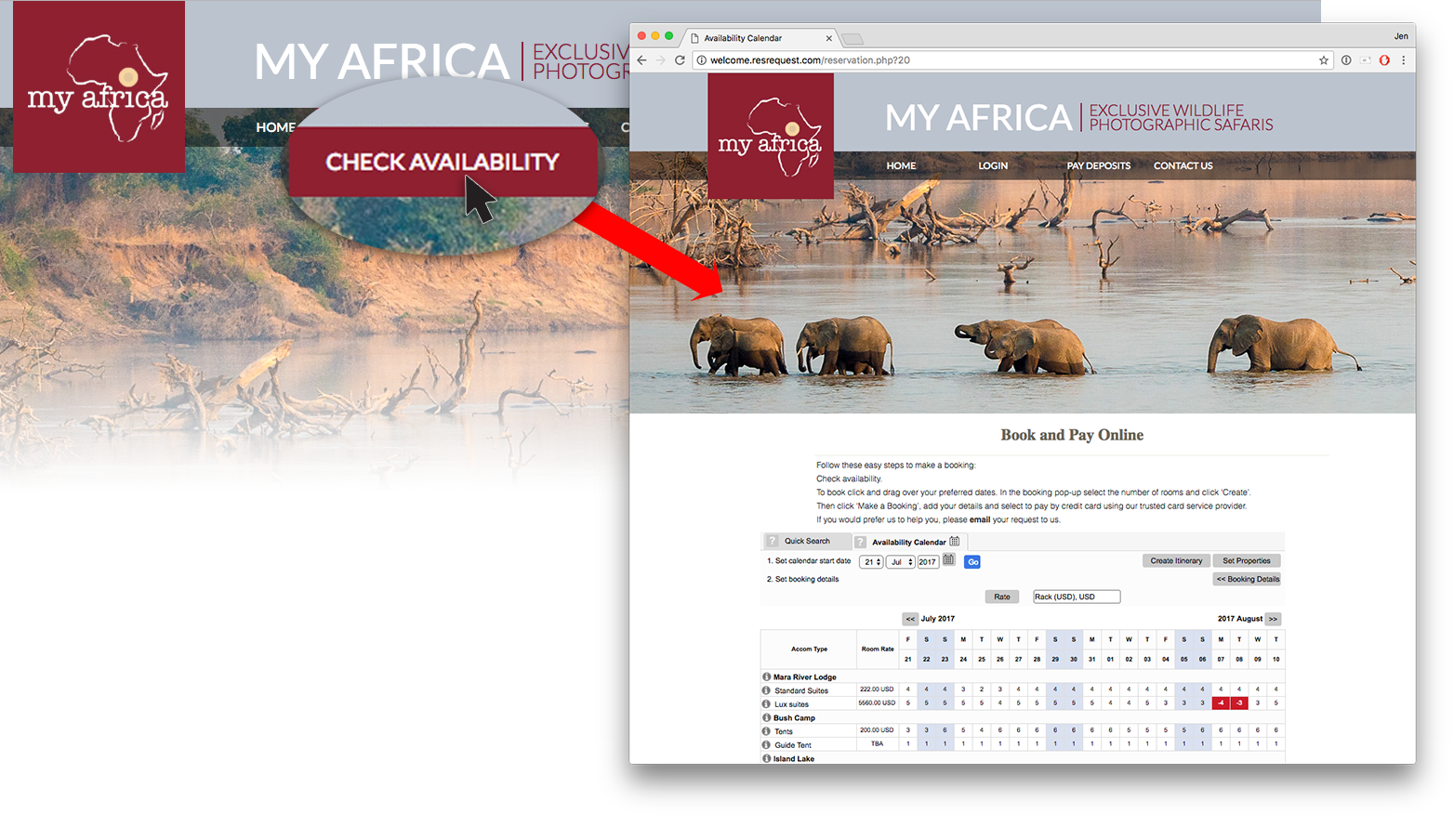
Opening the ResRequest booking page

To control what hotels and room types are available on your booking page, or to give users the ability to make bookings – simply change the settings for the public user in ResRequest’s User access. See our Public user access tutorial for instructions on how to do this.

To add property and room descriptions and images on the information popup, simply add them to the Business Structure.
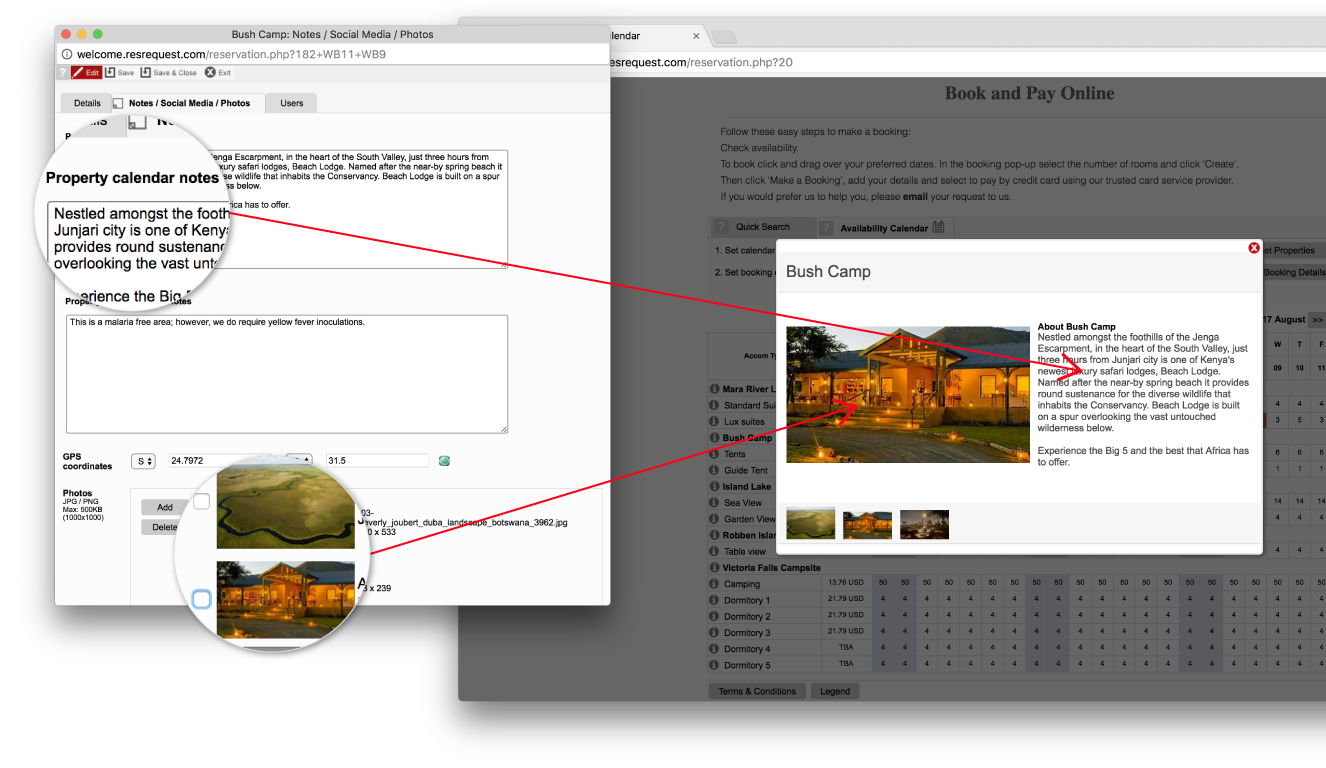
Add property and room notes on the Business structure

To add or edit room rates shown on the booking page, modify the settings in the ResRequest Default table.

To customise your booking page to match your brand, contact ResRequest’s Support centre. Tell them what you’d like changed and our team will put it together. Budget for 4 to 8 hours at our standard support set up fee (depending on how fancy you’d like to get!).

To enable payments on the ResRequest booking page, sign up with one of ResRequest’s Payment Gateway partners and activate their account in ResRequest. This enables customers to pay during booking – which is great for you and for them. The payment is enabled through the gateway and is recorded on their booking in ResRequest. Take a look at the Payment Gateway section to get set up with this great functionality.


CHANNEL MANAGEMENT

Getting started

  • What’s available in channel management

Bookings from your website

  • ResNova
  • ResRequest booking options
  • The ResRequest booking page
  • ResNova
  • Working with ResRequest’s API
  • Handling bookings from online channels

Distribute to Agents

  • Travel agents
  • Connect your stock to Agents
  • Give your Agent a login

OTA sales

  • What are OTAs
  • Connect your stock to OTAs
  • Connect with Booking.com
  • OTA Cancellations

Keep up to date with us

Subscribe to our blog
Atta Logo    Satsa

Menu

  • Home
  • Product Releases
  • Contact Us
  • Technical Alerts
  • Coffee Chats
  • Webinars
  • Professional Services
  • Email Series 2022
  • Webinars Index
  • Email Series 2023

Privacy policy
Terms of use
Fair use policy

Visit our website

ResRequest website

ResRequest Modules

  • Business Intelligence
  • Central Reservations
  • Channel Management
  • Customer Relationship Management
  • Developer
  • Email Series 2022
  • Email Series 2023
  • Financial Management
  • Marketing tools
  • Payment Gateways
  • Point of sale
  • Product
  • Professional Services
  • Property Management
  • ResConnect
  • ResInsite
  • ResNova
  • System Setup
  • Technical Alerts
  • Technical Tips
  • Telephone Management
  • Webinars Index
© Copyright - ResRequest Support - Enfold WordPress Theme by Kriesi
ResNovaResRequest booking options
Scroll to top

This site uses cookies. By continuing to browse the site, you are agreeing to our use of cookies.

Accept settingsView SettingsIgnore

Cookie and Privacy Settings


How we use cookies

We may request cookies to be set on your device. We use cookies to let us know when you visit our websites, how you interact with us, to enrich your user experience, and to customize your relationship with our website.

Click on the different category headings to find out more. You can also change some of your preferences. Note that blocking some types of cookies may impact your experience on our websites and the services we are able to offer.

Essential Website Cookies

These cookies are strictly necessary to provide you with services available through our website and to use some of its features.

Because these cookies are strictly necessary to deliver the website, refusing them will have impact how our site functions. You always can block or delete cookies by changing your browser settings and force blocking all cookies on this website. But this will always prompt you to accept/refuse cookies when revisiting our site.

We fully respect if you want to refuse cookies but to avoid asking you again and again kindly allow us to store a cookie for that. You are free to opt out any time or opt in for other cookies to get a better experience. If you refuse cookies we will remove all set cookies in our domain.

We provide you with a list of stored cookies on your computer in our domain so you can check what we stored. Due to security reasons we are not able to show or modify cookies from other domains. You can check these in your browser security settings.

Other external services

We also use different external services like Google Webfonts, Google Maps, and external Video providers. Since these providers may collect personal data like your IP address we allow you to block them here. Please be aware that this might heavily reduce the functionality and appearance of our site. Changes will take effect once you reload the page.

Google Webfont Settings:

Google Map Settings:

Google reCaptcha Settings:

Vimeo and Youtube video embeds:

Accept settingsClose