

ResRequest Support
  • Home
  • Modules
    • Central Reservations
    • Channel Management
    • Customer Relationship Management
    • Business Intelligence
    • Property Management
    • Financial Management
  • Latest News
    • Webinars
    • Coffee Chats
    • Professional Services
    • Product Releases
    • Technical Alerts
  • For System Administrators
    • Developer
    • System Setup
    • Technical Tips
  • Add-On Products
    • ResConnect
    • ResNova
    • ResInsite
  • Product
    • ResRequest Enterprise
    • ResConnect
  • Contact Us
  • Menu Menu

OTA Cancellations

OTA Cancellations

Cancellations are now handled via OTAs in ResRequest. Let’s have a look at how this works:

  • Bookings now cancelled in Booking.com or Expedia will be cancelled in ResRequest automatically
  • Emails to the primary contact will now clearly indicate if a user needs to manually adjust the booking in ResRequest or not 

Considering this, let’s see what changes have been made to emails to the primary user:

Creating a booking via OTA:

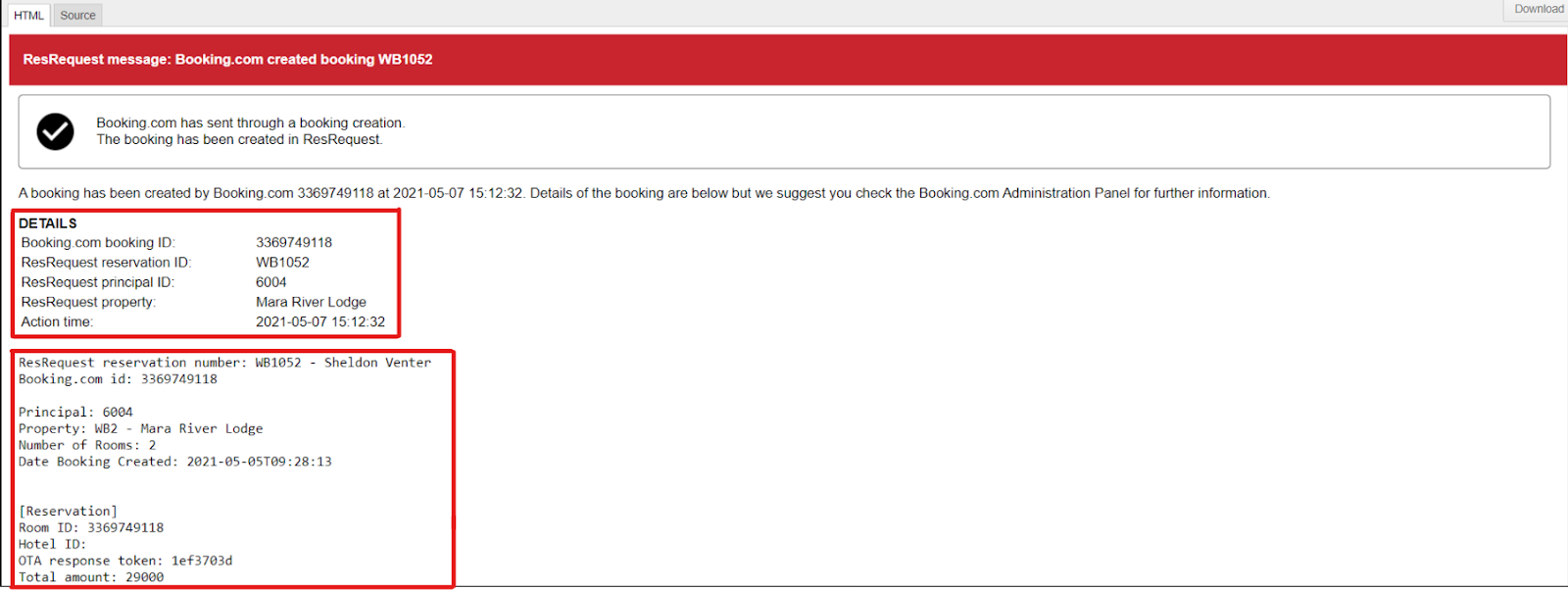
When a booking has been created successfully, the email will clearly state that with a checkmark followed by text that states “The booking has been created in ResRequest”, this is indicated in the image below:

Just below that information, there will be a detailed description of the booking information and below that, the reservation details are shown.
If a Booking has been modified via OTA:

When bookings are modified via an OTA those changes do not automatically get made in your ResRequest system. You will receive an email that will indicate that a modification has been made. This will be clearly indicated with an exclamation mark and in red text, “Please update this booking manually in ResRequest”, as seen in the image below:
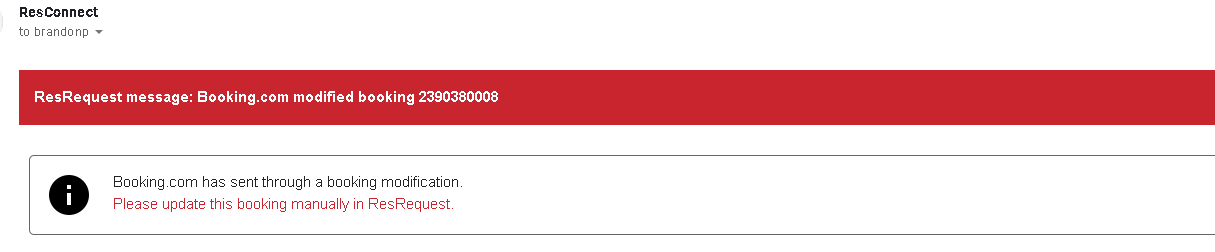
Just below that information, we will get a detailed description of the booking and below that, we will find the reservation details.

If a Booking has been cancelled via OTA:

If the cancellation was successful, the email will be presented with a checkmark. This will be followed by the text, “The cancellation has been made in ResRequest” as seen in the below image:

Just below that information, we will get a detailed description of the booking followed by the reservation details

Now that we have had a look at how emails will be sent if the booking is successful, let’s have a look at what happens if there is an error in the booking process:

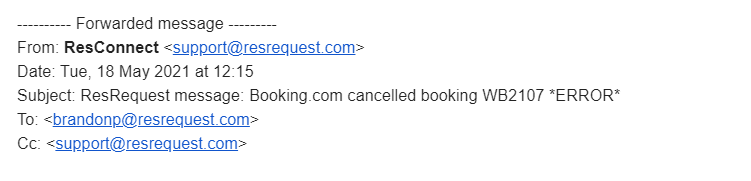
Firstly, in the subject line of the email, it will indicate that there is an error as seen in the below image:
Opening the email, you will clearly see an exclamation mark indicating that there is an error. This will be followed by the text in red, “Please update this booking manually in ResRequest.”

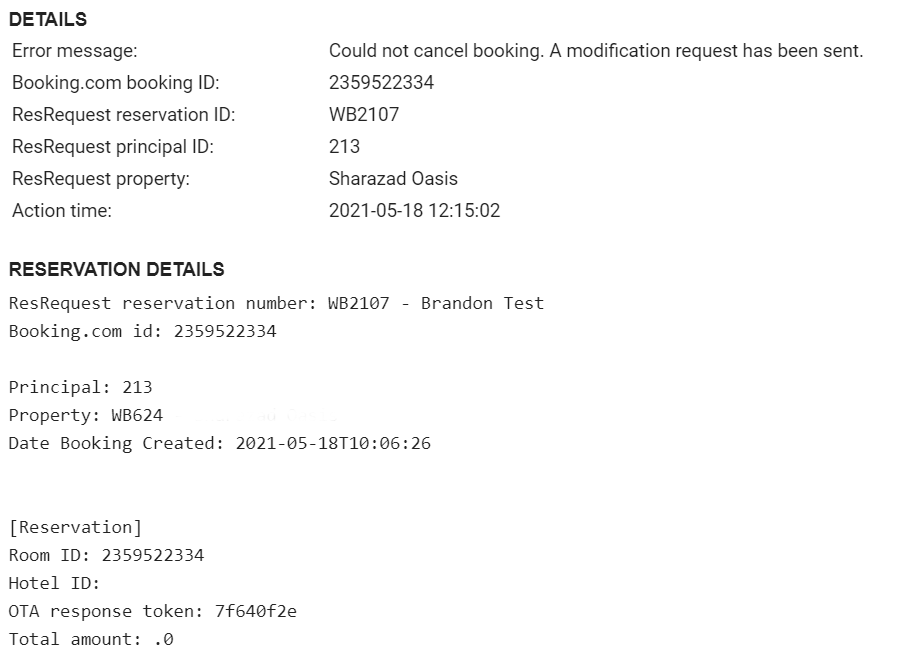
In the detail section below this, it will give you an error message followed by the booking details.

CHANNEL MANAGEMENT

Getting started

  • What’s available in channel management

Bookings from your website

  • ResNova
  • ResRequest booking options
  • The ResRequest booking page
  • ResNova
  • Working with ResRequest’s API
  • Handling bookings from online channels

Distribute to Agents

  • Travel agents
  • Connect your stock to Agents
  • Give your Agent a login

OTA sales

  • What are OTAs
  • Connect your stock to OTAs
  • Connect with Booking.com
  • OTA Cancellations

Keep up to date with us

Subscribe to our blog
Atta Logo    Satsa

Menu

  • Home
  • Product Releases
  • Contact Us
  • Technical Alerts
  • Coffee Chats
  • Webinars
  • Professional Services
  • Email Series 2022
  • Webinars Index
  • Email Series 2023

Privacy policy
Terms of use
Fair use policy

Visit our website

ResRequest website

ResRequest Modules

  • Business Intelligence
  • Central Reservations
  • Channel Management
  • Customer Relationship Management
  • Developer
  • Email Series 2022
  • Email Series 2023
  • Financial Management
  • Marketing tools
  • Payment Gateways
  • Point of sale
  • Product
  • Professional Services
  • Property Management
  • ResConnect
  • ResInsite
  • ResNova
  • System Setup
  • Technical Alerts
  • Technical Tips
  • Telephone Management
  • Webinars Index
© Copyright - ResRequest Support - Enfold WordPress Theme by Kriesi
Classic Rooming Calendar
Scroll to top

This site uses cookies. By continuing to browse the site, you are agreeing to our use of cookies.

Accept settingsView SettingsIgnore

Cookie and Privacy Settings


How we use cookies

We may request cookies to be set on your device. We use cookies to let us know when you visit our websites, how you interact with us, to enrich your user experience, and to customize your relationship with our website.

Click on the different category headings to find out more. You can also change some of your preferences. Note that blocking some types of cookies may impact your experience on our websites and the services we are able to offer.

Essential Website Cookies

These cookies are strictly necessary to provide you with services available through our website and to use some of its features.

Because these cookies are strictly necessary to deliver the website, refusing them will have impact how our site functions. You always can block or delete cookies by changing your browser settings and force blocking all cookies on this website. But this will always prompt you to accept/refuse cookies when revisiting our site.

We fully respect if you want to refuse cookies but to avoid asking you again and again kindly allow us to store a cookie for that. You are free to opt out any time or opt in for other cookies to get a better experience. If you refuse cookies we will remove all set cookies in our domain.

We provide you with a list of stored cookies on your computer in our domain so you can check what we stored. Due to security reasons we are not able to show or modify cookies from other domains. You can check these in your browser security settings.

Other external services

We also use different external services like Google Webfonts, Google Maps, and external Video providers. Since these providers may collect personal data like your IP address we allow you to block them here. Please be aware that this might heavily reduce the functionality and appearance of our site. Changes will take effect once you reload the page.

Google Webfont Settings:

Google Map Settings:

Google reCaptcha Settings:

Vimeo and Youtube video embeds:

Accept settingsClose